Add FreeSpin Package
On this Backoffice page, you can create new freespin packages. FreeSpin is a casino ‘ticket': the player can use a freespin to make a bet in certain casino games. After that, the freespin is considered used.
The freespins can be used as a reward in a promotional campaign. However, before the configuration of the promotional campaign, you need to create the freespin package on the Add FreeSpin Package page.
Please, note that freespins are available only for some of the casino providers. The list of providers supporting freespins can be found further in this article.
The following options are available on the Add FreeSpin Package page:
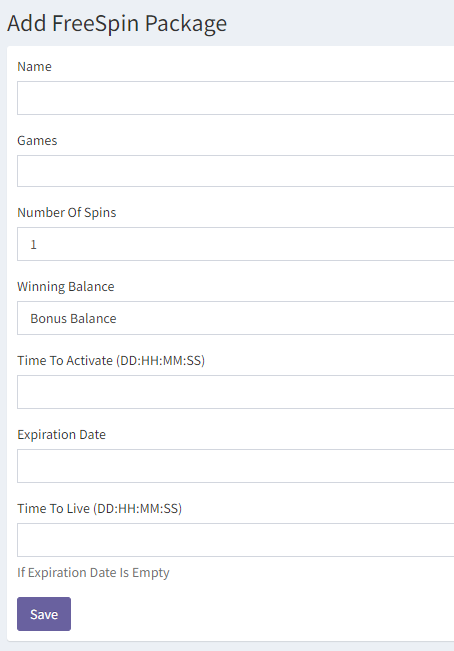
- Name – the title of the freespin package. You will be able to find the package by this name in the FreeSpin Package List and when you add a promotional campaign.
- Games – choose the games, in which the players will be able to use the freespins, here. Note: The user will have to use all freespins in one game. For example, if you add 3 games here, the user will only be able to use freespins in one of them, the one in which he activated the package.
- Number of Spins – choose the maximum number of bets in one package. One spin always equals the minimum bet in the game, so one package will equal Minimum bet x Number of spins.
- Winning Balance – choose the balance for the player winnings from the freespin package (Bonus Balance/Money Balance).
- Time to Activate – the time period, during which the player can activate a freespin package after he received it. If the user does not activate the freespin package during this period, the package will become expired. Activation is the first free spin. Note: The freespin time to activate should be longer than reward's Acceptance Timeout, if manual acceptance is used. I.e., the freespin should not expire before it is accepted by the player.
- Expiration Date – the expiration date for the freespin package template.
- Time to Live – the time, during which the player can use the freespins after he activated the package. Note: You can only configure either Expiration Date or Time to Live, not both of these settings. This period should be longer than reward's Acceptance Timeout, if manual acceptance is used. I.e., the freespin should not expire before it is accepted by the player.
After the player receives a freespin package, every time he opens the game with freespins, he will see the number of the remaining freespins:
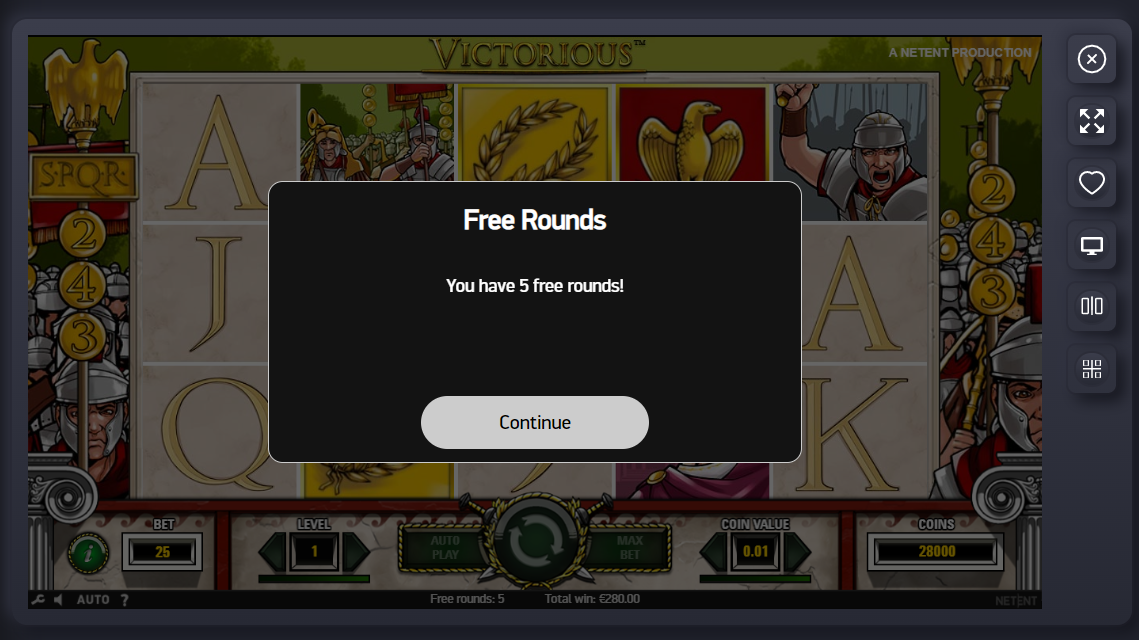
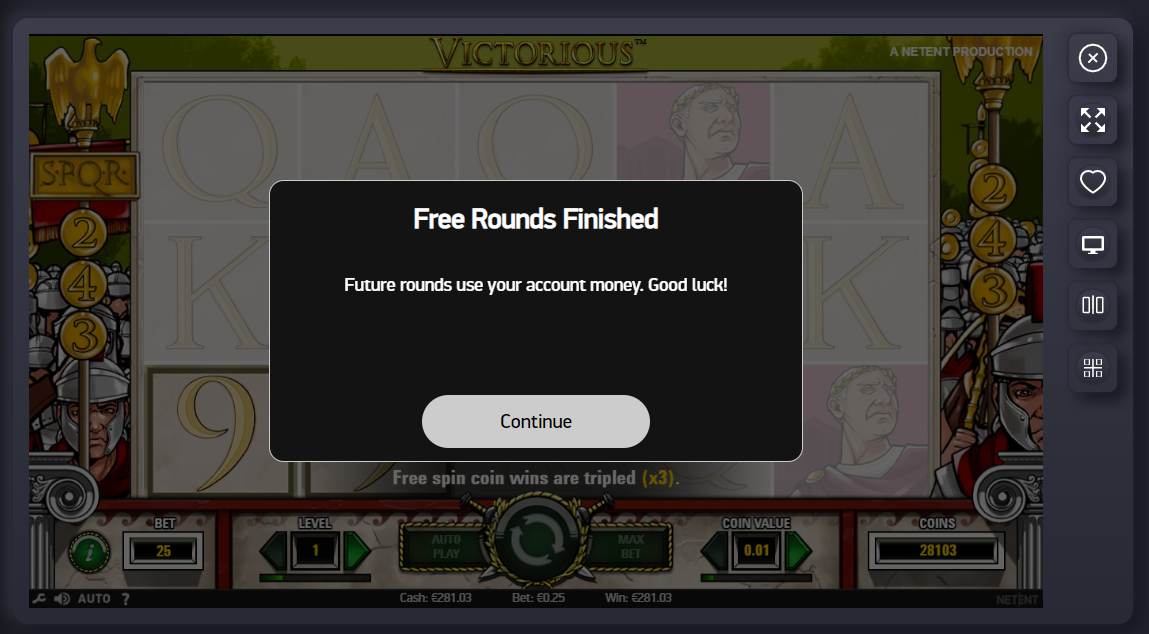
While the freespin package is active, the player will not be able to change the bet amount and other game settings. However, as soon as the player uses all freespins, the functionality will become available again. The player will be warned when the freespins end:
Providers
The following providers support freespins in all of their games except for board games:
Amigo Gaming, OutcomeBet, PariPlay, Pragmatic Play Direct.
Softswiss also supports freespins but only for certain sub-providers and with limitations described further in the tablesheet:
| Provider | Can be cancelled or not | Several games per FS pack | Bet levels | Other peculiarities |
|---|---|---|---|---|
| 1spin4win | yes | yes | no | 1 credit per line, Allways games the min value should be 10 credits |
| 3oaks | yes | no | yes | Expiration date - 1 month |
| Amatic | no | no | no | Can be issued for several games per 1 FS pack, if all games have the same number of lines. When a free spins bonus request is sent, there is a field 'freespinBet'. In case it has 0, then the min bet value in free spins will be issued. Otherwise, freespinBet should be the bet per game in credits (minimum 1 credit per line on all lines, Allways games the min value should be 10 credits). It means that for a 10-line bet the freespinBet can be 10 (=10 credits), 20 (=20 credits, 2 credits per line), etc. For a 20-line game - 20 credits, 40 credits, etc. |
| Belatra | no | no | no | |
| BetSoft | yes | yes | no | |
| BGaming (SoftSwiss) | yes | yes | yes | Bet levels correspond to coin values |
| Blueprint | yes | yes | yes | 1) Cancellable FS: a player can reject them but that needs to be configured (not many of the provider's OPs have this live). 2) FS expiration period: configurable, default 7 days. 3) Bet levels: there is an endpoint that can be hit that returns bet levels per game. |
| Booming | yes | yes | no | FSs are temporarily unavailable: the provider is working on a new version of FSs. |
| GameArt | yes | no | no | Only one game available per freespin package |
| Gamebeat | yes | no | no | |
| Gamzix | yes | yes | yes | Bet levels: 1, 2, 5, 10, 20. Minimal bet level by default. It is possible to issue several packs for one game, they will be played separately. |
| EGT | yes | no | yes | Bonus Free Spins feature now allows a setup of free spin campaign on all kind of bet you have for the EGT games. You can create campaigns not only on minimum bet, but on the maximum too and any of the other bets available for the games you selected. Only 1 campaign per game – this means that if you select to run a campaign on Burning Hot, on the max bet, you will not be able to setup another campaign for Burning Hot, no matter of the bet chosen, until the first one is used up (all free spins have been awarded) or expired; You will need to send the request for free spins campaigns now with the following info: - start and end date (preferably in UTC) - currency - desired game - desired amount of free spins - desired bet - min, max or different |
| ELK | no | no | yes | FS bonus can be issued for the period 1 - 7 days: duration can not be less than 1 day and more than 7 days. |
| Evoplay | no | no | yes | 5 bet levels (depending on the coin settings of specific currency/account) |
| Endorphina | yes | yes | no | The feature is not available for the casinos with individually set bet limits. Freespins and the bet levels are set up for the following list of currencies only: EUR, USD, CAD, RUB, PLN, SEK, NOK, KZT, TRY, BTC, ETH, UAH |
| Habanero | no | no | no | |
| Holle games | no | no | no | |
| iGTech | yes | no | no | |
| Igrosoft (Slotegrator) | yes | yes | yes | FS bonus can be issued for many games per 1 pack, the bonus can be played only in the game where they were activated. No cancellation after the bonus game started |
| Infingame (Playson for MGA, Bet2Tech) | no | no | no | One pack of freespins can be issued only for one game |
| iSoftbet | yes | no | no | FS bonus can be cancelled any time before the last spin of the bonus round 1 game in 1 FS bonus: if you want to issue FS bonuses for several games at a time, you should issue a bonus for each game separately. A player can only play 1 FS bonus at a time: it is possible to have several active bonuses simultaneously but they have to be played one by one. |
| KA Gaming | yes | yes | no | |
| Mascot | yes | yes | no | |
| Mancala Gaming | no | no | no | |
| MrSlotty | no | yes | no | |
| Netent | yes | yes | yes | |
| Nolimit City | no | no | no | |
| Nucleus | yes | yes | no | |
| Onlyplay | no | no | no | |
| ORYX (Gamomat) | yes | no | no | |
| Platipus | no | yes | no | FS bonus can be issued for many games per 1 pack, the bonus can be played only in the game where they it was activated |
| Play'N'Go | no | yes | no | FS bonus can be issued for many games per 1 pack, the bonus can be played only in the game where it was activated FS bonus appears in the game 5 min. later after it was activated ("reload function") If FS package has been activated and started, from the point of view of the provider it cannot be cancelled or expired. If FSs have already been expired in the casino, the player will not receive a win resulted from FSs. |
| Playtech | no | no | no | 1 game in 1 FS bonus: if you want to issue FS bonuses for several games at a time, you should issue a bonus for each game separately. FS bonus cannot be cancelled. Player may choose to play an issued bonus later. Message "Free spins" in the game shows that player uses FS bonus. |
| Pragmatic Play | yes | no | no | |
| Red Tiger Gaming | yes | yes | no | |
| Redgenn (Playson, Booongo for CUR) | no | no | no | One pack of freespins can be issued only for one game |
| Relax Gaming | yes | no | no | 1 game in 1 FS bonus: if you want to issue FS bonuses for several games at a time, you should issue a bonus for each game separately. FS bonus cannot be cancelled once the player activated the freespins Switch between devices is available: if a player starts playing FSs on desktop, it is possible to finish playing on mobile No freespins for Hacksaw and PGSoft |
| Push Gaming | yes | no | no | 1 game in 1 FS bonus: if you want to issue FS bonuses for several games at a time, you should issue a bonus for each game separately. FS bonus cannot be cancelled once the player activated the freespins Switch between devices is available: if a player starts playing FSs on desktop, it's possible to finish playing on mobile |
| Slotmill | yes | yes | yes | Bet levels vary from game to game and currency. The provider has API for fetching bet levels & bet amounts. |
| Spinomenal | no | no | no | 1 game in 1 FS bonus: if you want to issue FS bonuses for several games at a time, you should issue a bonus for each game separately. Some games have a limited number of free spins that can be issued in one pack. You can use the following document (column FreeSpin Marketing max limit) |
| Spribe | yes | no | yes | Bet levels in EUR: 1: 0.1 2: 0.4 3: 0.9 4: 1.6 5: 2.5 It is possible to issue several packs for one game, they will be played separately. |
| Thunderkick | no | yes | yes | FSs can be issued for several games per 1 request but once started in one game they need to be finished in that game. No switch between devices: if a player starts playing FSs on desktop, it is possible to finish playing only on desktop, and if a player starts playing FSs on mobile, it is possible to finish playing only on mobile. FS bonus can not be cancelled. |
| TrueLab | yes | no | no | |
| Quickfire | yes | yes | yes | |
| Quickspin | no | no | no | 1 game in 1 FS bonus: if you want to issue FS bonuses for several games at a time, you should issue a bonus for each game separately. FS bonus can not be cancelled. |
| Yggdrasil | yes | yes | no | |
| Wazdan | yes | no | no | 1 game in 1 FS bonus: if you want to issue FS bonuses for several games at a time, you should issue a bonus for each game separately. FS bonus can not be cancelled. |
| 5men | yes | yes | yes |